

Comment on page
Test directory
How to locate the tests created by Cover Plugin for IntelliJ, within your project.
The tests created by Cover Plugin for IntelliJ will be placed in a location within the project according to the following:
- 1.If a test source directory (e.g
src/test/java) exists in the current project module, Cover Plugin will add the tests there. - 2.If no existing test source directory could be found for the current project module, Cover Plugin will add tests to
src/test/javain the same module as the class for which tests are written (project_root/module/src/test/java).
We recommend always explicitly creating a test source directory
src/test/java in the relevant module so that Cover Plugin for IntelliJ knows where to put new test classes.Cover Plugin does not add a duplicate test if exactly the same test already exists.
If you have multiple test source directories set up for a module, you can use the Override Test Directory setting (Diffblue > Change Settings) to ensure that Cover Plugin creates tests in your preferred directory.
For example, you may have a Gradle configuration similar to the following:
sourceSets {
test {
java {
srcDir "src/test/java"
srcDir "src/diffblueTest/java"
}
}
}
You can use the Override Test Directory setting to make sure that Cover Plugin adds tests to the
src/diffblueTest/java directory: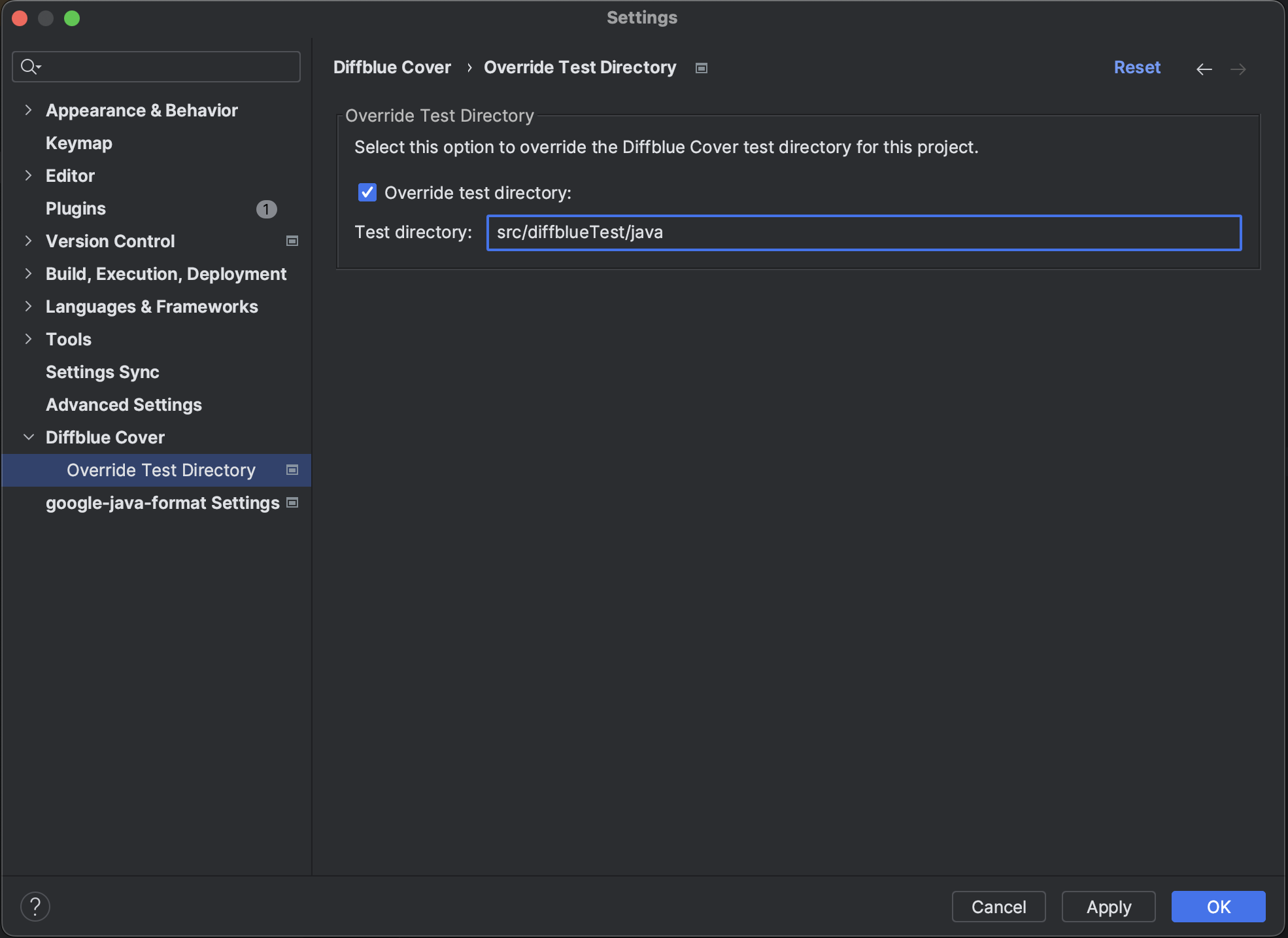
Last modified 5d ago